Create quickly
Build WBS, activities, calendars and logic with direct controls, bulk entry, P6 XML import or bounded natural language.
A5D PROJECT CONTROLS
Create, validate, calculate and export construction schedules through focused controls or bounded natural language.
BUILT FOR PROJECT-CONTROLS WORK
A5D is intended for civil engineers, planners, schedulers, project-controls professionals and construction teams who need fast creation without surrendering calculation integrity.
Build WBS, activities, calendars and logic with direct controls, bulk entry, P6 XML import or bounded natural language.
Validate networks and calculate dates, float and criticality through tested project-controls services.
Use synchronised table, Gantt, detail, comparison and XML views with revisions and audit history.
REAL PRODUCT WORKSPACE
The focused schedule table is the default. Gantt, details and XML remain one click away. A guided sample is available after sign-in.
Open the guided workspace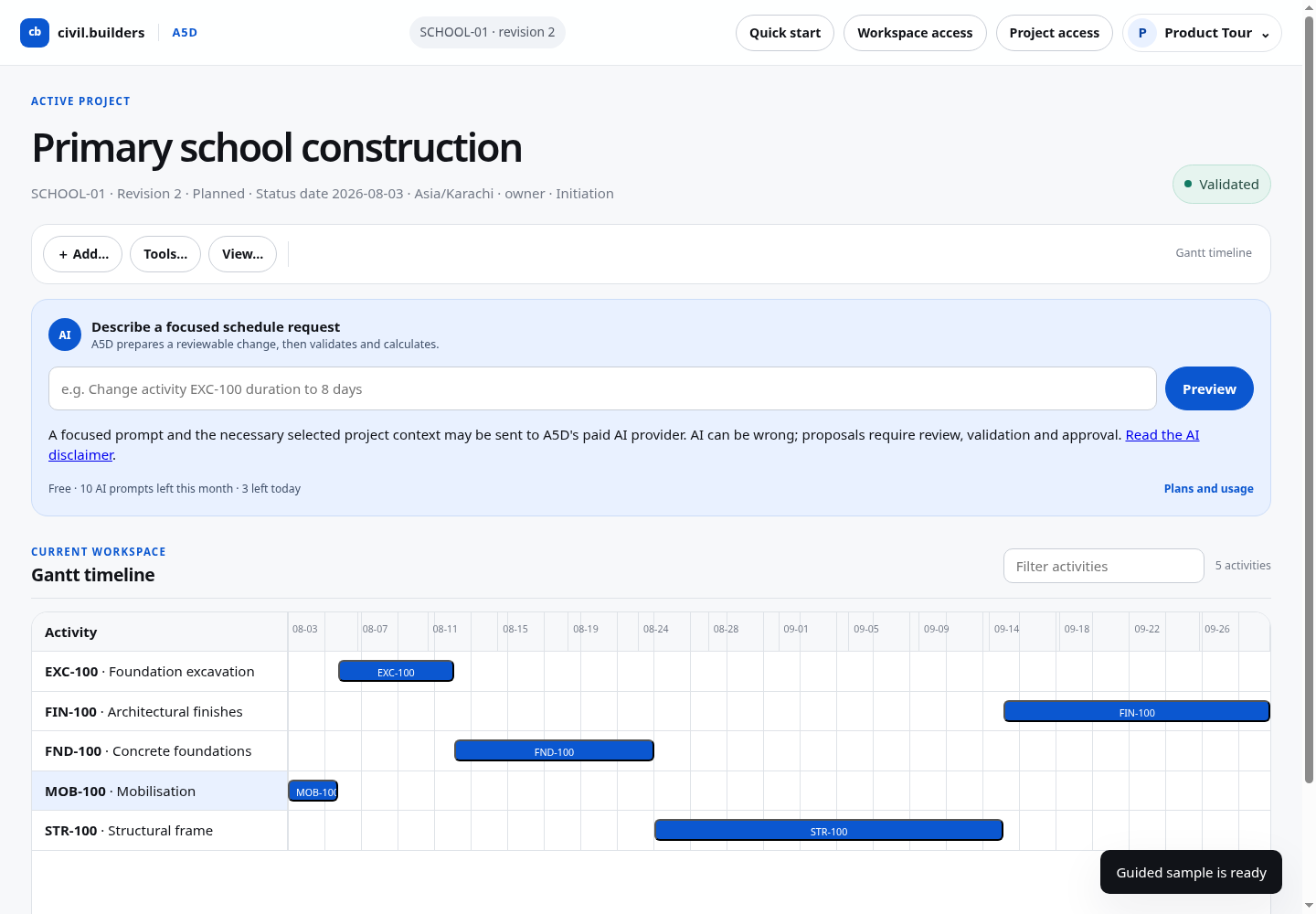
CLEAR SUBSCRIPTION LIMITS
Regional availability notice: A5D is not currently offered to persons located in the European Economic Area or the United Kingdom, or to organisations established in those regions. Please do not register, purchase a subscription, create or join a workspace, or submit project data while located in these regions.
$0
INDIVIDUAL
$19 / month
or $190/year
$99 / month
or $990/year
Custom
Paid access is activated automatically after confirmed checkout. Taxes and final currency are shown before payment. Cancelling preserves access through the paid period; plan reductions never automatically delete project data. Lemon Squeezy is the merchant of record and authorised reseller for payment transactions.
HOW ACCESS IS DELIVERED
Create an account, verify the address and accept the current terms and policies.
Start Free or select a monthly or annual plan from Plans and billing.
Confirmed payment activates capacity automatically. Your account shows plan, usage and renewal status.
SUPPORT AND RESPONSIBLE USE
A5D can assist with project controls, but users remain responsible for source data, contractual interpretation, safety, construction methods and final decisions. Review material outputs with qualified professionals before relying on them.
A5D is independently developed and is not affiliated with, endorsed by or certified by Oracle. Oracle and Primavera are trademarks of Oracle Corporation and/or its affiliates. Compatibility may vary by product version and must be independently verified.
PROJECT CONTROLS WORKSPACE
Start from a blank project, load a guided sample, or import a Primavera P6 Professional V25.12 XML file.
Add WBS, activities and logic with clear forms—no prompt required.
Review dates, float, criticality and validation evidence.
Move between schedule table, Gantt, details and generated XML.
ACTIVE PROJECT
A focused prompt and the necessary selected project context may be sent to A5D's paid AI provider. AI can be wrong; proposals require review, validation and approval. Read the AI disclaimer.
CURRENT WORKSPACE
| ID | Activity name | WBS | Duration | Early start | Early finish | Total float | Status |
|---|
Choose a row in the table or Gantt to inspect its schedule evidence.
Use Tools → Compare schedule to review an approved baseline against the current schedule.
Use Tools → Budget and funding to record approved facts.
Use Tools → Resources and costs to define rates and activity assignments.
Use Tools → BIM / 4D / 5D mappings to connect model objects with schedule and cost evidence.
Use Tools → Performance report to build evidence from the current revision.
Open this view to generate the current XML representation.